
Thanks to the IAVAT Board for investing in the development of a new Fair Management System. It has been tested with several fair managers and we all agree it’s working very well.
All teacher accounts have now been created. Access the new system at: https://ilffasectionfairsystem.org/
· Username will be the first part of your email (before the @ sign). Example: mine is lallen because my email is lallen@ilaged.org
· You should have received an email with instructions to set your password from “IL FFA Section Fair” with the subject, “Claim your Section Fair Management System Account” If you cannot find it, look in your spam folder.
**NOTE: if you received more than one automated email, please use the NEWEST to set your password.**
· If you still cannot find your email, go to the Fair System and use the forgot password feature.
· If that does not work, contact Luke Allen for an account reset. lallen@ILAgEd.org
Once your have logged in, you need to upload your signed 2026-27 Vo Ag Fair Contract.
In the top left corner menu, select “Upload Contract” from your dashboard home screen, OR you can click the menu in the top left corner and choose “Upload Contracts”
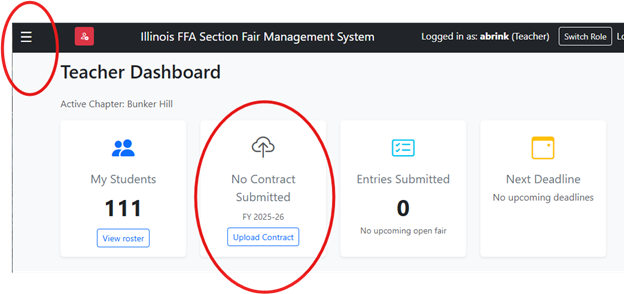
Contracts must be all three pages, and must be uploaded by the end of the day Friday May 22.
View Fair Contract Instructions here.
If you still need to download the blank fair contract, view it here.
Tips:
· Please ensure a fair contract is completed by YOU if you are leaving your school.
· If you have an upcoming fair, check with your fair manager to see if they have your fair set up to make entries.
· We will follow up with instructions for using the new fair system to make fair entries. The most important thing right now is to get your contracts uploaded.
If you have issues or need assistance, please contact Luke Allen, LAllen@ILAgEd.org